This article goes one level deeper than our beginner’s guide. It covers how EN 18031 requirements are assessed, what the 14 security mechanisms ask of a product, and what the lab actually tests.
New to EN 18031? Start with the beginner’s guide: what the standard is, who needs it, self-declaration versus Notified Body, the eight testing steps, and what drives time and cost. This article assumes you have that background.
EN 18031 is not a tick-box checklist. A requirement can be assessed in up to three layers — not every requirement has all three:
“Not applicable” is never automatic. The manufacturer documents the path taken through the decision tree and the justification for it, and the lab reviews both. A justification that is missing or does not hold is recorded as a non-conformity.
Two simplified examples of how the decision tree plays out:
Secure update (SUM). Can the product’s software or firmware be updated? If it cannot, and one of the standard’s exceptions applies — for example, the software is immutable — SUM is not applicable, and the justification goes to the lab for review. If it can, the tree goes on to whether each update’s source and integrity are verified, and ends in pass or fail.
Authentication (AUM). Can the product’s protected settings or functions be reached through a network or user interface? If not — or if one of the standard’s exceptions applies — authentication is not applicable. If they can, the product must authenticate whoever is connecting, and the tree goes on to the authentication mechanism itself: password rules and so on, ending in pass or fail.


Each layer needs something different from the manufacturer:
| Layer | What the lab does | What it needs from you |
|---|---|---|
| On paper | Follows the decision tree for each requirement, using your documentation | A description of each mechanism and, for each requirement, the path taken through the decision tree with a written justification — including every “not applicable” |
| On the product | Checks that what is documented is what is actually there | Test units identical to the version that will be sold, with the accounts and access needed to operate them |
| Under test | Tests whether each mechanism holds up | The firmware and app versions under test — and time for fixes and retests |
The standard groups its requirements into mechanisms, each with a short code. A mechanism is simply a protection feature. Eight of them appear in all three parts of EN 18031; the other six belong to the part that deals with networks (-1) or to the parts that deal with personal data and money (-2, -3). The six groups below are ours, for readability; the standard simply lists the mechanisms.
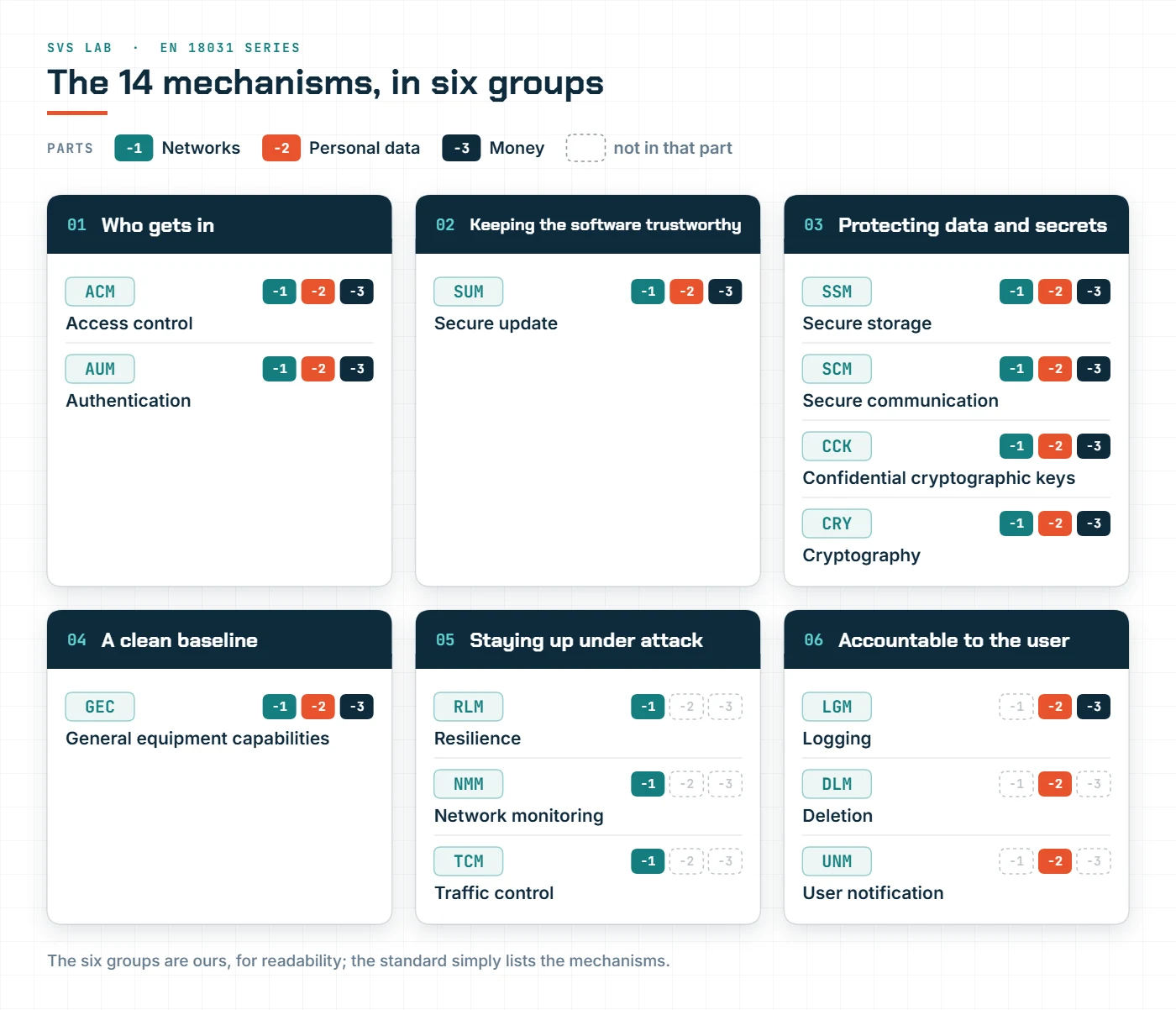
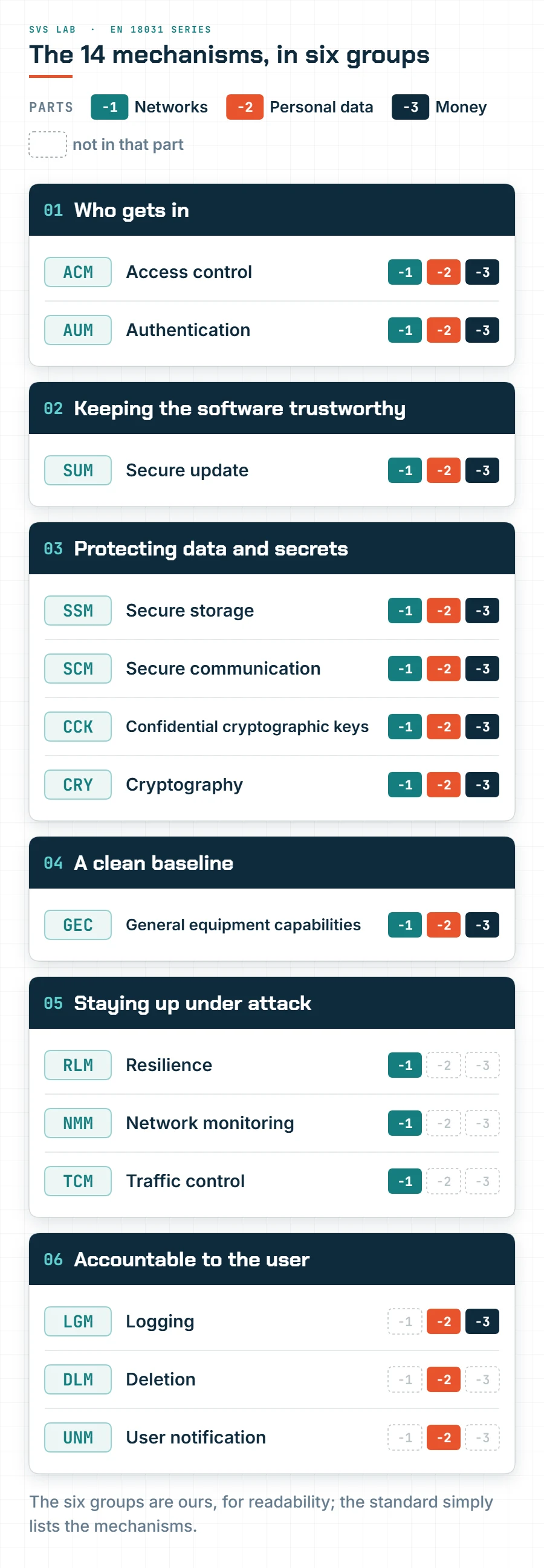
ACM — Access control. Decides who, and what, may reach the product’s protected functions and data. The lab checks that access to them is controlled wherever the standard requires it, and that only authorised users and devices get through. In EN 18031-2, toys and childcare products have additional access-control requirements of their own.
AUM — Authentication. Checks that a user or device is who it claims to be before access is granted. This is where passwords are assessed: how a password or other authenticator is validated, whether it can be changed, what a factory-default password must be (unique to each unit and strong, or the user is forced to change it at first use), how and when other passwords are set, and whether repeated guessing is limited. In practice the lab looks for passwords written into the code, a universal default password shared by every unit, and how default passwords are generated.
SUM — Secure update. Requires the product’s software to be updatable — the standard allows only a few exceptions, such as immutable software — and each update’s source and integrity to be verified before it is installed, so that tampered or counterfeit firmware cannot be installed. The update mechanism also has to be able to install updates automatically: either with no one at the device, or at a time or on a trigger a person has approved.
SSM — Secure storage. Protects the sensitive things the product stores — keys, passwords, security settings and, depending on the part, personal or financial data — against being read or altered.
SCM — Secure communication. Protects data in transit in three ways: it cannot be altered or come from an impostor, it cannot be read, and a recorded message cannot be replayed later. In practice: personal or sensitive data is encrypted in transit. Bluetooth Low Energy’s built-in encryption is optional and not always switched on, so the lab checks that it is actually used, or that the product adds its own.
CCK — Confidential cryptographic keys. The keys themselves have to be strong enough and properly generated, and a key installed at the factory has to be unique to each unit, with narrow exceptions.
CRY — Cryptography. The product has to use best-practice cryptography: recognised methods with no known practical attack.
GEC — General equipment capabilities. A set of baseline requirements. The product’s software and hardware must contain no publicly known exploitable vulnerabilities that affect what the standard protects — unless the manufacturer documents that a vulnerability cannot be exploited in this product, has been mitigated, or is accepted on a risk basis. This is what the SBOM and component scan support. Network interfaces and services are exposed only where needed, and described in the user documentation. No physical interface is exposed unless the product needs it. And the product validates the input it receives.
RLM — Resilience. The product has to limit the effects of a denial-of-service attack on its network interfaces and return to a defined state afterwards.
NMM — Network monitoring and TCM — Traffic control. These two apply to network equipment — products such as home routers that connect other devices to the internet. Such a product has to be able to spot signs of a denial-of-service attack in the traffic it passes between networks (NMM), and to control that traffic, for example by blocking or redirecting it (TCM).
LGM — Logging (EN 18031-2 and -3). The product records events that matter to the personal or financial data it handles, keeps them in persistent storage, and records when — or at least in what order — they happened.
DLM — Deletion (EN 18031-2). The user can permanently delete their personal data, and the security settings tied to it, from the product — for example before selling or disposing of it.
UNM — User notification (EN 18031-2). The user is told about changes that affect the protection or privacy of their personal data.
| Code | Mechanism | The plain question | Parts |
|---|---|---|---|
| ACM | Access control | Who, and what, is allowed to reach the product’s protected functions and data? | -1 -2 -3 |
| AUM | Authentication | How does the product check that a user or device is who it claims to be? | -1 -2 -3 |
| SUM | Secure update | Can the software be updated, and is every update verified first? | -1 -2 -3 |
| SSM | Secure storage | Are stored secrets and sensitive data protected from being read or altered? | -1 -2 -3 |
| SCM | Secure communication | Is data in transit protected against eavesdropping, tampering and replay? | -1 -2 -3 |
| CCK | Confidential cryptographic keys | Are the keys strong, properly generated and unique to each unit? | -1 -2 -3 |
| GEC | General equipment capabilities | Is the product free of known exploitable vulnerabilities, with unneeded interfaces closed and inputs checked? | -1 -2 -3 |
| CRY | Cryptography | Does the product use recognised, current cryptography? | -1 -2 -3 |
| RLM | Resilience | Does it limit the effects of a denial-of-service attack and return to a defined state? | -1 |
| NMM | Network monitoring | For network equipment: can it spot signs of a denial-of-service attack in the traffic it passes? | -1 |
| TCM | Traffic control | For network equipment: can it control that traffic, for example by blocking or redirecting it? | -1 |
| LGM | Logging | Does it record events that matter to the personal or financial data it handles? | -2 -3 |
| DLM | Deletion | Can users permanently delete their personal data from the product? | -2 |
| UNM | User notification | Is the user told about changes that affect the protection or privacy of their data? | -2 |
The EU recognised EN 18031 with restrictions. Three of them affect how a product is designed and assessed: points where meeting the standard does not, by itself, give the presumption of conformity. Each one sits in a single mechanism:
| Restriction | Mechanism | Part |
|---|---|---|
| The product lets the user choose not to set or use a password | Authentication (AUM) | -1, -2, -3 |
| A toy or childcare product does not ensure parental or guardian access control | Access control (ACM) | -2 |
| EN 18031-3’s assessment criteria for secure updates — not accepted as sufficient for products that handle money, whatever the design | Secure update (SUM) | -3 |
The first two can be avoided by design. The third cannot: an EN 18031-3 product with an update mechanism always needs a Notified Body.
Where a restriction applies, the presumption of conformity is lost for the whole legal requirement concerned, and the manufacturer has to use a conformity procedure that involves a Notified Body. The beginner’s guide explains self-declaration and the Notified Body procedure.
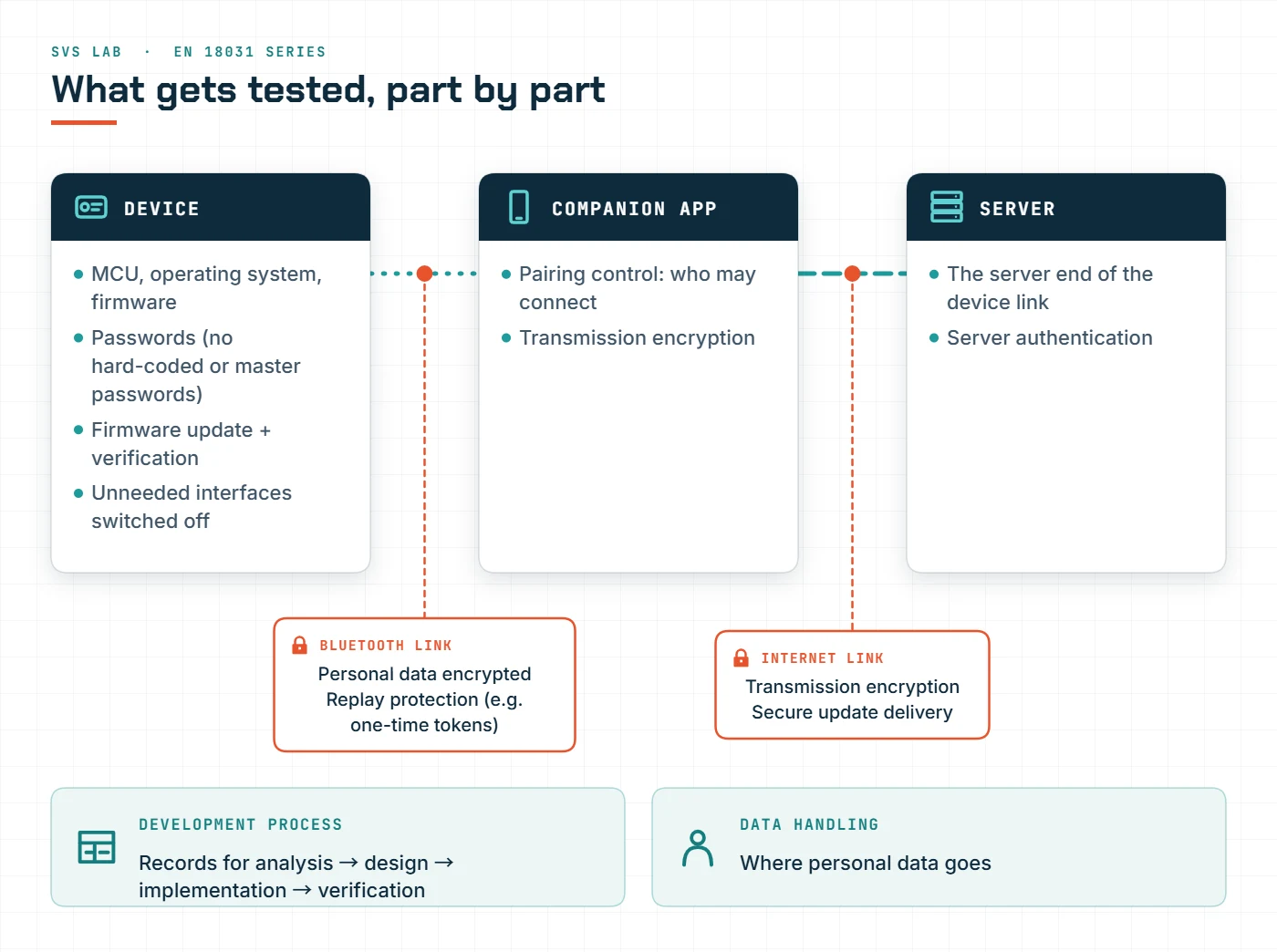
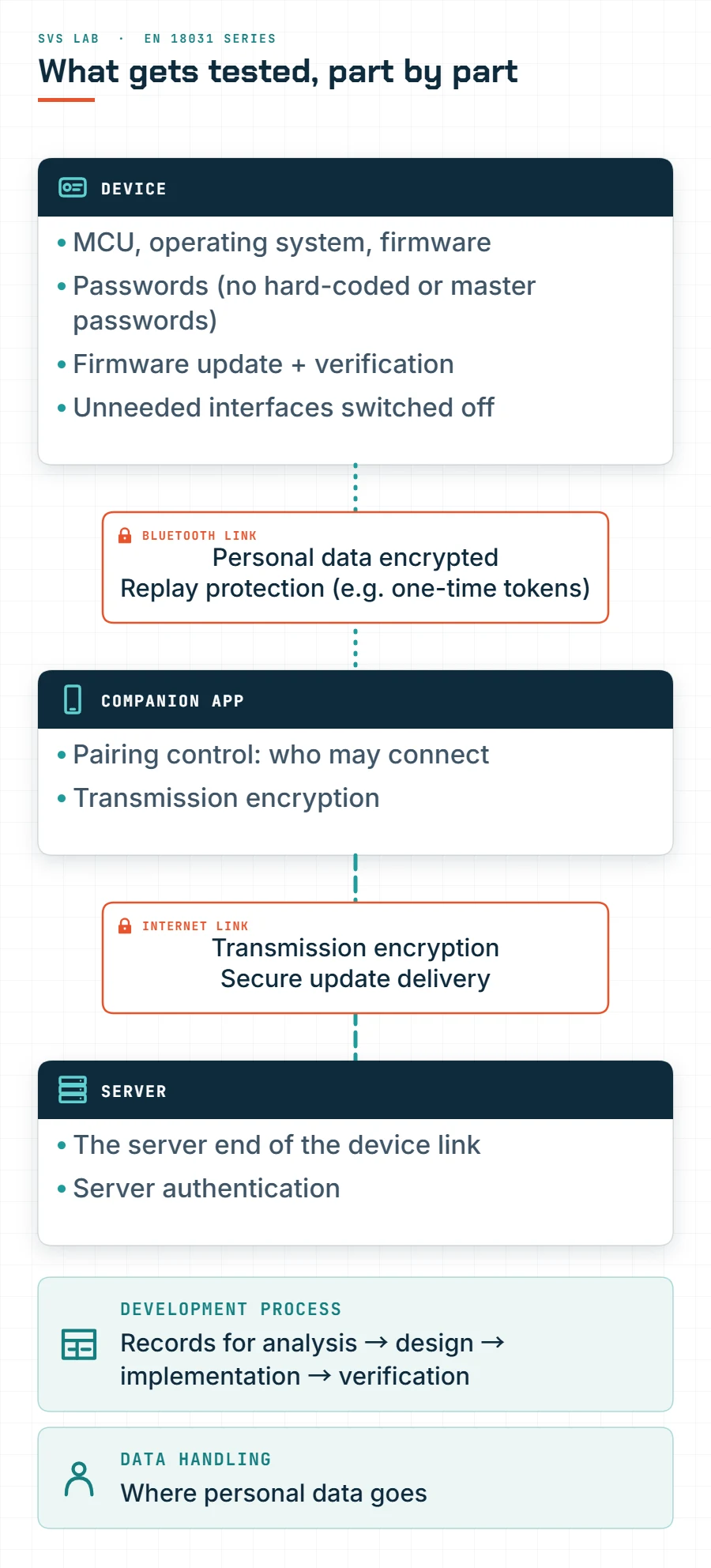
The product assessed under EN 18031 is the radio device itself — including the links it uses to talk to a companion app and a server. Those links are part of the standard’s assessment: authentication, encryption in transit, replay protection, update delivery. The lab also looks at the app and server ends of those links, because the device’s security depends on them.
| Part | What the lab checks | Worth knowing |
|---|---|---|
| Device | Microcontroller (MCU), operating system, firmware, external interfaces such as Bluetooth and Wi-Fi, passwords, update mechanism | The core of the test |
| App | Pairing control (who is allowed to connect), transmission encryption | An app is not radio equipment, so it is assessed through the device’s link to it, not separately |
| Server | The server end of the device’s link: server authentication, transmission encryption, update delivery | EN 18031 sets no requirements for the server itself |
EN 18031 is a product standard: it says what the product must achieve, not which tools the lab must use. These are the methods the lab uses to produce the evidence:
None of these is prescribed by EN 18031 itself. Under the CRA the SBOM becomes mandatory, and development documentation and regular security testing are required too.
A short scoping call with the lab confirms which parts and mechanisms need testing for your product, and what to prepare. Book a scoping call. To prepare, use the pre-submission checklist on our EN 18031 testing page. For the basics, see the beginner’s guide.
Q: Do all 14 mechanisms apply to my product? No. Which ones are relevant depends first on which parts of EN 18031 apply — six of the mechanisms belong to one or two parts only — and then on the decision tree for each requirement. A requirement can come out as “not applicable”, but each such result needs a written justification that the lab reviews.
Q: Does the lab test our server? EN 18031 sets no requirements for the server itself; its subject is the radio device. The device’s link to the server — server authentication, encryption in transit, update delivery — is part of the assessment, and the lab also looks at the server end of that link, because the device’s security depends on it.
Q: Does the lab need our source code? Not necessarily. EN 18031 does not require you to hand over source code. The SBOM and component scan can work from the firmware image. Scanning the source code is an additional method and needs the source; whether it is used is agreed at scoping.
More questions — on self-declaration, apps, firmware updates and known vulnerabilities — are answered in the FAQ on our EN 18031 testing page.
By Secure Vectors Surveillance × Applus+ Laboratories
* This article is commentary on regulation and standards, not legal advice. The scope of EN 18031 and its restrictions are stated as published at the time of writing. Whether a specific product falls within the RED must be determined case by case against the legal texts and the interpretations of the competent authorities.